Local detection · No account required

Your data should stay yours.

Protect sensitive information before it reaches AI tools.

Privacy Shield detects sensitive information before you accidentally share it, helping you stay in control of credentials, personal data, and confidential content.

Install for Chrome · One-time purchase · No account required

config.env — pasting into ChatGPT
OPENAI_API_KEY=sk-test-xxxxxxxxxxxxxxxx
DATABASE_URL=postgresql://user:password@db.example.com/app
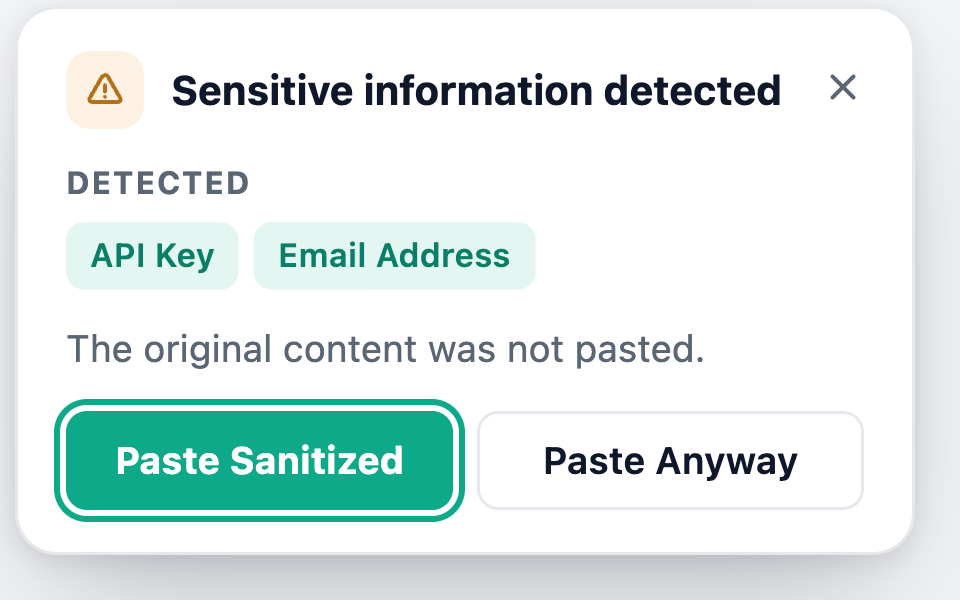
Privacy Shield: Sensitive information detected — API Key, Database Credential. Paste Sanitized / Paste Anyway.
Watching for a paste…

You paste something sensitive

Protect what you paste. Before it leaves your browser.

API KeysTokensEmails Phone NumbersCredit CardsPrivate Keys Database CredentialsIP Addresses Other SecretsCustom Rules — configure your own
The problem

AI makes sharing information effortless. That's the problem.

Developers and teams increasingly paste error logs, source code, configuration files, API responses, database queries, customer information, and credentials into AI assistants. The problem is rarely malicious intent — it's an accidental paste.

Without Privacy Shield
Developer
Copy
Paste
No control
AI Tool — secret included
vs
With Privacy Shield
Developer
Copy → Paste
Privacy Shield detects
Paste Sanitized / Paste Anyway / Cancel
AI Tool — your call, either way
How it works

Protection happens before you hit send.

01

Paste

Work normally. Copy and paste into ChatGPT, Claude, or anywhere else — any input field, any site.

02

Detect

Privacy Shield checks the pasted content against 15+ local detectors — API keys, tokens, credentials, and more. Nothing leaves your device to do this.

03

Decide

Paste Sanitized swaps secrets for placeholders. Paste Anyway needs a second, explicit confirmation. Cancel pastes nothing.

See it in action

See what Privacy Shield catches.

Before
AWS_ACCESS_KEY_ID=AKIAIOSFODNN7EXAMPLE AWS_SECRET_ACCESS_KEY=wJalrXUtnFEMI/K7MDENG/bPxRfiCYEXAMPLE DATABASE_URL=postgresql://user:pw@db.example.com/app GITHUB_TOKEN=ghp_16C7e42F292c6912E7710c838347Ae178B4a
Paste Sanitized
AWS_ACCESS_KEY_ID=[REDACTED] AWS_SECRET_ACCESS_KEY=[REDACTED] DATABASE_URL=[REDACTED] GITHUB_TOKEN=[REDACTED]
What it protects

15+ detectors, ten categories.

Every category below runs locally, all the time — nothing here requires a network call to check.

sk-••••••••••••••••

API Keys

OpenAI, cloud provider, and generic API key formats.

ghp_•••••••••••••••

Tokens

OAuth/access tokens, JWTs, and VCS tokens (e.g. GitHub).

a•••@•••••.com

Emails

Email addresses anywhere in the pasted text.

+1 •••-•••-••93

Phone Numbers

Common phone number formats.

•••• •••• •••• 4242

Credit Cards

Card numbers matching standard issuer formats.

-----BEGIN PRIVATE KEY-----

Private Keys

PEM-format private keys and similar credential blocks.

postgresql://user:••••@host

Database Credentials

Connection strings with embedded credentials.

10.0.••.•••

IP Addresses

IPv4/IPv6 addresses, including internal ranges.

AKIA••••••••••••

Other Secrets

Passwords, cloud credentials, and sensitive URLs.

your-pattern → [REDACTED]

Custom Rules

Define your own regex-based detection rules.

Security without changing how you work.

Work normally

No copy-paste ritual, no separate app to open — Privacy Shield only steps in when it finds something.

Catch mistakes early

Sensitive data is caught the moment you paste it, before it reaches ChatGPT, Claude, or anywhere else.

Built around privacy

Detection runs entirely on-device. The only thing that ever leaves your browser is your license key, to activate your purchase.

Designed for modern workflows

Works on any site by default, with built-in recognition for ChatGPT, Claude, Gemini, Copilot, Perplexity, and Grok.

Architecture

Privacy should be part of the architecture.

Not a marketing claim — here's exactly what happens to a paste, and what doesn't.

Your Browser
Pasted content
Privacy Shield detection engine (local)
Paste Sanitized / Paste Anyway / Cancel
Destination site
Processed locally: every paste, checked against 15+ detectors, entirely in-browser.
Leaves the browser: only your license key, sent once to activate/validate a purchase.
Stored: settings and aggregate daily counters only — never the values you pasted.
Telemetry: none in the extension. No analytics, no third-party runtime code.

Read the full Security page →

Built for anyone handling sensitive information.

Developers

  • API keys
  • Tokens
  • Environment variables
  • Database credentials
  • Logs & source code

Designers & Creators

  • Client information
  • Internal documents
  • Confidential project details

Teams

  • Every install protects one person's pastes
  • Roll it out across your team to reduce accidental sharing

Security-conscious users

  • An extra layer between what you copy
  • And where you paste it — on any site
The product

See what's protected, right from the toolbar.

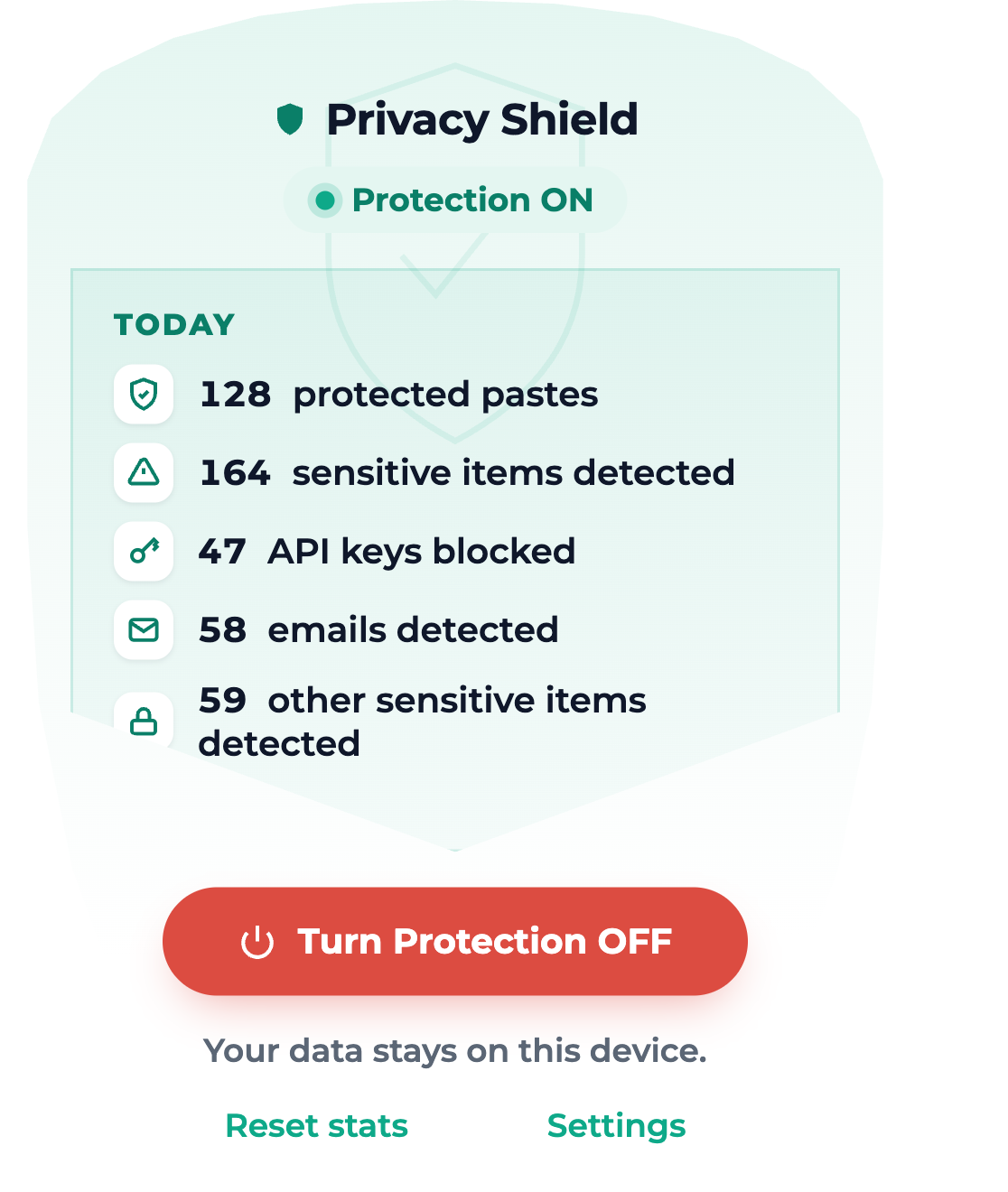
Privacy Shield toolbar popup showing Protection ON and today's stats: protected pastes, sensitive items detected, API keys blocked, emails detected.
For developers

Built into the browser, not bolted onto your workflow.

Privacy Shield is a Chrome extension — there's no CLI, no IDE plugin, no API to integrate. It works transparently in any input field, on any site, the moment it's installed.

  • Manifest V3, minimal permission surface
  • No clipboardRead, no tabs, no scripting
  • Zero runtime dependencies shipped in the extension
// manifest.json — permissions "permissions": ["storage", "alarms"], "host_permissions": [ "https://*.dodopayments.com/*" ], ✓ No clipboardRead ✓ No tabs / activeTab ✓ No scripting
Pricing

One-time purchase. No subscription.

Every feature, every detection category, from day one. No free tier — no watered-down version to upsell from.

Personal

For your own browser.
$4 one-time
1 browser profile
  • All 15+ detectors, all categories
  • Custom detection rules
  • Works on any site + 6 built-in AI sites
  • 100% on-device processing
Get Personal — $4

Multi-profile

For more than one browser profile.
$6 one-time
Up to 3 browser profiles
  • Everything in Personal
  • Activate on up to 3 profiles or devices
  • Same one-time price, no renewal
Get Multi-profile — $6

Frequently asked questions

What is Privacy Shield?+
A Chrome extension that detects sensitive information — API keys, tokens, credentials, and more — the moment you paste it, and lets you paste a redacted version instead.
What can it detect?+
15+ built-in detectors across ten categories: API keys, tokens (OAuth/JWT/VCS), emails, phone numbers, credit cards, private keys, database credentials, IP addresses, other secrets, plus your own custom rules.
Does Privacy Shield send my data to a server?+
No. The content script and background service have no network capability at all. The only network calls anywhere in the extension activate or validate your license key against Dodo Payments — never anything you paste.
Does Privacy Shield store the content I paste?+
No, never — not even the matched values. It only keeps aggregate daily counters (e.g. "12 API keys blocked today") for your own popup dashboard.
Which AI tools does it support?+
Protection works on any site by default. There's built-in recognition for ChatGPT, Claude, Gemini, Microsoft Copilot, Perplexity, and Grok, and you can add any custom site yourself.
Can I turn protection off?+
Yes — a single toggle in the toolbar popup turns protection on or off across all your tabs.
Can I customize detection rules?+
Yes. Add your own pattern-based rules (e.g. for an internal secret format) from the Settings page.
Which browsers are supported?+
Chrome, built on Manifest V3.
Is there a free tier?+
No. Privacy Shield is a one-time purchase — Personal ($4) or Multi-profile ($6) — with every feature unlocked from the start, no subscription.
How do I activate after purchasing?+
Install the extension, then paste the license key from your purchase email into the toolbar popup and hit Activate. Protection turns on instantly.
How do I uninstall?+
Go to chrome://extensions, find Privacy Shield, and click Remove.

Keep using AI. Keep control of your data.

Add a privacy layer between what you copy and where you share it.